King James Bible - Verse+Audio
- 4.8
- Rating
- 100.00M
- Installs
- Free
- Price

 Analysis by App-foxy
I tend to keep a Bible app for the moments when carrying a printed Bible is inconvenient, but I do not want a tool that turns reading into a complicated project. King James Bible - Verse+Audio, developed by Ozion, takes a focused approach: it puts the King James Version, listening tools, and a daily verse in one place. After using it as a reading and listening companion, I found it most useful when I already knew what I wanted to read and needed a quick path from a busy moment to a familiar passage.
This is a free Bible study app in the Books & Reference category, available for users rated Everyone. It has built a very large audience, with over 100 million installs and a 4.8 average from around 2.5 million ratings. Those figures do not tell me whether it suits every reader, but they do show that it has become a familiar choice for people who want the King James Bible on a phone or tablet.
From a busy moment to a usable reading routine
I find this section most useful when I’m deciding how a brief opening can become a habit rather than a one-off check. A practical trick is to pair the daily verse with one small next step—reading its surrounding passage or listening to a chapter later—so the prompt has somewhere to lead. That sets up the next section’s closer look at choosing a starting point that fits the time and attention I actually have.
In-Depth Coverage of King James Bible - Verse+Audio
Starting with the right expectation
The first thing I would clarify is that this is specifically a King James Bible experience. That matters more than it may seem. If you enjoy the traditional wording, the rhythm of the language, and the familiarity of the KJV, the app feels appropriately direct. If you prefer contemporary translations for quick comprehension, this is not the place to expect modern phrasing. The app’s identity is built around one established translation rather than offering a broad comparison shelf.
That focus makes the starting condition simple. I can open it when I want to read a chapter, look up a verse, listen while doing something else, or receive a small prompt for daily reflection. I do not have to decide between several translations before beginning. The trade-off is equally clear: readers who regularly compare translations, consult academic notes, or build detailed cross-reference studies may eventually need another resource alongside it.
The app was released on January 2, 2018, and its current version is 3.64.0. It runs on Android 7.0 or later, which makes it accessible on many older devices as well as newer ones. I appreciate that kind of reach for a reference app, because a Bible tool is often most valuable when it remains available on a device that is not used for demanding games or heavy software.
Choosing a passage instead of wandering
My most effective workflow begins with a specific intention. I might decide to read a chapter before work, search for a verse connected to a topic, or continue from a passage I already know. That small decision prevents the app from becoming merely another feed to scroll through. The Bible is large, and a clear starting point makes the experience calmer.
For a verse lookup, I treat the app like a reference shelf rather than a social platform. I go in with a phrase, book, or remembered location, then use the result as a doorway into the surrounding passage. This is an important habit with any verse app: reading only the isolated line can remove its setting. The useful outcome is not simply finding a familiar sentence, but moving from that sentence into enough of the chapter to understand how it functions.
For longer reading, I prefer selecting a chapter and staying with it instead of jumping repeatedly through search results. The KJV’s older vocabulary can make this slower than reading a contemporary edition, especially when I am tired. That is not a flaw unique to the app, but it affects how I use it. I reserve it for attentive reading when I want the traditional text, and I switch to a modern translation elsewhere when immediate clarity is more important than the KJV style.
Turning reading into listening
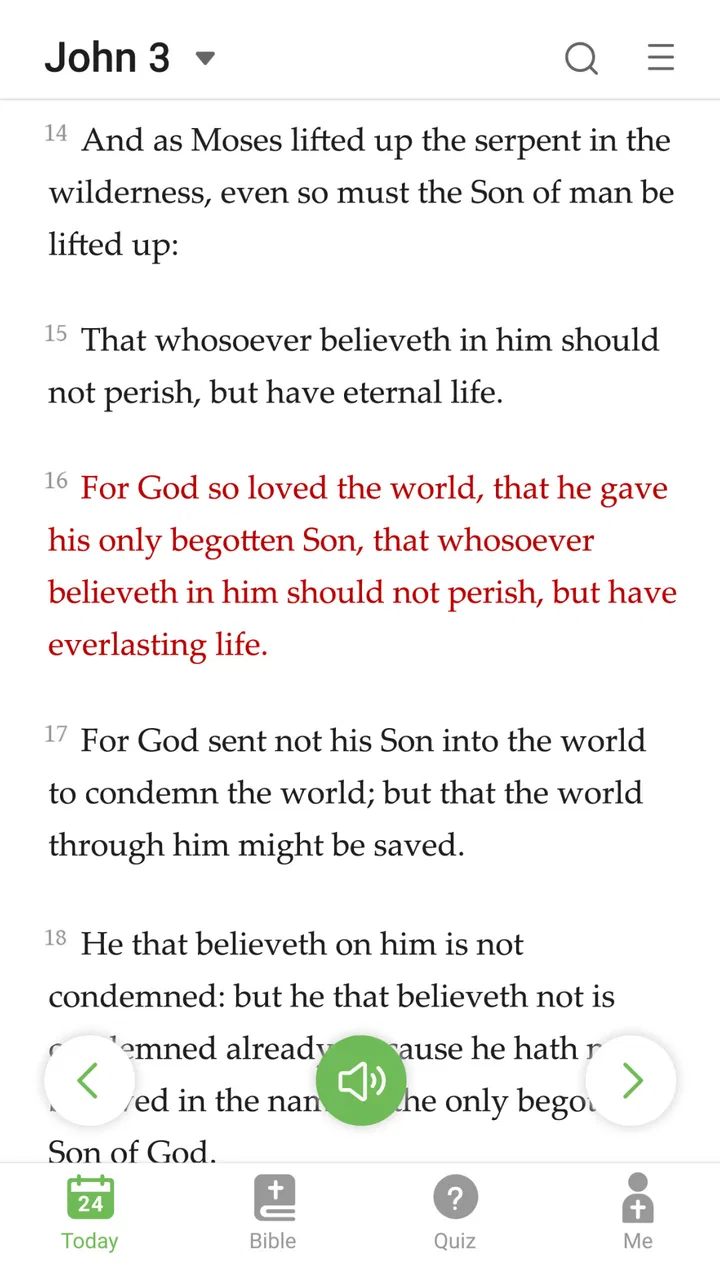
The audio feature changes the app from a screen-based reference tool into something I can use during a walk, a commute, or a quiet household task. I find this especially helpful when my eyes are occupied but my attention is available. Instead of forcing myself to read on a small display, I can listen to the passage and return to the text later when I want to examine a particular verse.
There is a practical difference between listening and studying. Audio is excellent for continuity and repetition, but it is less convenient when I need to compare two lines, inspect a word, or pause over a difficult phrase. My preferred handoff is to listen first for the broad shape of a chapter, then open the text afterward for slower reading. That two-stage method gives the audio a clear job without pretending it replaces close study.
You May Also Like

 Lords Mobile: Kingdom Wars
Lords Mobile Is a Kingdom-Building Routine, Not a Quick Match
A case-by-case verdict on the building, battles, device demands, and social commitments that make Lords Mobile rewarding for some players and exhausting for others.

 PDF Scanner app - TapScanner
TapScanner Makes Paperwork Easier to Capture, Check, and Share
TapScanner makes scanning with a phone feel less like a rescue operation and more like a dependable step in getting work done. Its capture tools are useful, though not flawless.

 Block Blast!
Block Blast! Shows How Much a Puzzle Game Can Leave Out
A quiet grid game shows why puzzle players increasingly value instant clarity, repeatable skill and low-pressure play—and where the genre still needs to catch up.

 Family Space
Family Space Review: A Shared Routine That Makes Family Life Easier
A parenting app earns its place not by adding more noise, but by making everyday coordination easier. Family Space gets that balance mostly right.

 1Weather Forecasts & Radar
1Weather Forecasts & Radar Makes the Daily Check Worthwhile
A good forecast does more than predict rain. This week's pick turns changing conditions into a clear, practical reason to check before you step outside.

 Clash of Clans
Clash of Clans Makes Patience Part of the Strategy
A village builder with a sharp tactical core, Clash of Clans turns patience into momentum and each raid into a small, satisfying act of judgment.
More From Our News Desk
View All News


Another useful routine is to replay familiar passages while doing repetitive work. Familiarity helps me notice emphasis and structure without constantly looking at the screen. With less familiar sections, I keep expectations modest: the traditional language can be harder to absorb by ear, so I may need to stop and read the same section visually. The app supports both modes, but the best result comes from choosing the mode that matches the moment.
Using the daily verse without letting it take over
The daily verse is a convenient entry point when I have not planned a reading session. It lowers the effort required to begin: one verse can become a short pause in the morning, a reminder during lunch, or a closing thought before sleep. I like it as a prompt, not as a complete substitute for reading a chapter or considering context.
A realistic everyday workflow looks like this: I check the daily verse before leaving home, listen to a longer passage later while walking, and return to the text in the evening to read the surrounding chapter. The daily selection starts the process, audio keeps it possible during an offline-feeling part of the day, and the text gives me the final opportunity to slow down. That sequence is more useful than treating each feature as a separate novelty.
The limitation is that a daily verse can encourage a very small reading habit if I never move beyond it. People who want a structured study plan, guided lessons, or a progressive course may find this approach too open-ended. The app gives me tools and prompts, but the responsibility for building a deeper routine remains with me.
Making the handoff from phone to conversation
A Bible app rarely ends with the reading itself. I may want to discuss a passage with a family member, bring it into a small group, or write a personal note after listening. King James Bible - Verse+Audio works best in that handoff when I use it as a shared reference point: I identify the book and chapter, read the passage carefully, and then carry the discussion outside the app.
The KJV can be helpful in group settings where people already recognize its wording. A familiar translation reduces confusion when several people are referring to the same traditional text. On the other hand, if a group uses another translation as its standard, I need to be prepared for wording differences. In that situation, this app is still useful for personal reading, but it may not be the best single source for collaborative study.
I also see a handoff between private reflection and practical reference. I might encounter a verse during a quiet moment, search it again later when a question comes up, and use the audio to revisit the surrounding chapter. The app supports that movement from inspiration to checking the text, although it does not turn a brief verse encounter into a full explanation by itself.
What the workflow produces
When the process works, I finish with something more useful than a notification or a saved screen. I have read a passage in the wording I wanted, heard it in a different way, and connected it to a repeatable daily habit. That combination is the app’s strongest result. It does not need to be elaborate to be valuable; a dependable path to text, audio, and a daily prompt can remove enough friction to make regular use realistic.
I especially recommend it to someone who already values the King James Version and wants one uncomplicated place for reading and listening. It is also a sensible option for a person who is beginning a personal Bible routine and does not want to purchase a printed edition immediately. Since the app is free, the initial barrier is low, although in-app purchases range from $0.99 to $9.99 per item. I would simply review any optional purchase screen carefully and decide whether the free experience already covers my needs.
The audience size is reflected in roughly 271 thousand reviews, but I would not use popularity alone as the deciding factor. The more important question is whether the KJV is the translation I genuinely want. A highly rated app built around the wrong translation will still feel wrong during everyday use. For me, the fit is strongest when the wording is a feature rather than an obstacle.
Where the flow breaks
The first break appears when I want modern language. The app’s commitment to the KJV is its defining strength, but it is also the clearest boundary. A reader who finds older expressions difficult may spend more time decoding sentences than reflecting on them. In that case, a contemporary Bible app with several translations would be a better primary choice, while this one could remain a secondary reference for traditional wording.
The second break comes when I expect a full study library. I can read, search, listen, and use the daily verse as a prompt, but serious research often requires more: extensive commentary, original-language tools, maps, scholarly references, or side-by-side translation controls. I would not choose this app as my only platform for seminary-level work or detailed passage analysis. Its value is in accessible text and audio, not in replacing every specialized study resource.
Audio also has a natural weakness. Listening is convenient, but it is not equally effective for every passage or every listener. If I am in a noisy environment, concentrating on unfamiliar KJV wording becomes difficult. I may need headphones, a quieter setting, or a return to the written text. The feature is most successful when I treat it as another route into the Bible, not as a universal replacement for reading.
There is also a personal-discipline issue. A daily verse can start a habit, but it cannot create sustained attention on its own. If I open the app only for the prompt and close it immediately, I receive a small moment rather than a broader reading practice. I get better results by attaching the prompt to a concrete next step, such as reading the rest of the chapter or listening during a planned walk.
Who should install it, and who should look elsewhere
I would recommend King James Bible - Verse+Audio to KJV readers who want quick access on a compatible Android device, people who like alternating between reading and listening, and anyone who benefits from a small daily reminder. It is also a good fit for households or groups where the traditional translation is already familiar. The free price makes it easy to test without committing to a physical purchase first.
I would suggest another option to readers who need multiple translations in the same study screen, a large academic reference collection, or a guided curriculum. Someone who prefers a modern translation may also be happier with an app designed around contemporary English. The choice is not about whether one approach is universally better; it is about whether the KJV’s language and the app’s focused set of tools match the way the reader actually studies.
After using it, my view is straightforward: this is a practical companion for a specific kind of Bible routine. Its best path runs from a clear intention, through text or audio, into a short reflection or a longer reading session. The handoffs are simple enough for everyday use, and the friction is mostly predictable: traditional language, limited depth for specialist study, and the need to supply your own structure.
If that trade-off sounds right, I think Ozion’s app is worth trying. It is free, rated for Everyone, and supported on Android 7.0 and later, with a current version of 3.64.0. I would install it for the KJV itself, use the audio when my hands or eyes are occupied, and treat the daily verse as a doorway rather than the destination. The strongest reason to keep it is not the number of features, but how quickly it turns a spare moment into a familiar passage.
FAQs for King James Bible - Verse+Audio
01What features does the King James Bible - Verse+Audio app offer?
The King James Bible - Verse+Audio app provides a comprehensive set of features including daily verses, audio narration for hands-free listening, and a search function for quick access to specific passages. Users can also bookmark their favorite verses, make notes, and share scriptures easily across social media platforms.
02Is the King James Bible - Verse+Audio app available offline?
Yes, the King James Bible - Verse+Audio app supports offline access. Once you download the desired chapters or the entire Bible, you can read and listen to scriptures without an internet connection, making it perfect for on-the-go use or in areas with limited connectivity.
03Are there any costs associated with using the King James Bible - Verse+Audio app?
The app is free to download and use, offering access to a wide range of features. However, it may contain optional in-app purchases or advertisements. These purchases typically enhance user experience by removing ads or providing additional content such as premium audio narrations.
04How user-friendly is the King James Bible - Verse+Audio app for beginners?
The app is designed with a user-friendly interface that caters to both beginners and seasoned users. It features intuitive navigation, easy-to-read text, and customizable settings such as font size and background color, ensuring a comfortable reading and listening experience for all users.
05Does the King James Bible - Verse+Audio app support multiple languages?
The primary focus of the app is the King James Version, which is in English. However, it may offer translations or parallel versions in other languages for comparative study. Users should check the app's description for specific language options and availability.
Pros
- Comprehensive offline access to scriptures.
- Daily verses help maintain spiritual routine.
- Audio feature enhances convenience on-the-go.
- User-friendly interface for easy navigation.
- Bookmarking function for quick reference.
Cons
- Requires in-app purchases for full features.
- Some ads may interrupt reading experience.
- Limited customization of audio settings.
- Occasional glitches in verse search feature.
- No dark mode for night reading comfort.

King James Bible - Verse+Audio
Gallery